API Reference
The WhautoChat REST API lets your own systems send messages on every channel and manage everything around them: contacts, tags, segments, broadcasts, WhatsApp templates and webhooks. Create contacts from a web form, send a WhatsApp template when an order ships, tag people from your CRM, or start a broadcast without opening the app.
Download the Postman collection, import it, then set host and x-api-key in the "WhautoChat Rest API" environment.
Base URL
https://api.whauto.chat/v1
Self-hosted installs use https://<your-server>/rest/v1. The exact host for your account is shown in the app under Integrations > REST API as Your API Host. Every path in this reference starts with /v1/.
API keys
Open Integrations and click Connect (or Edit Setup) on the REST API card.
-
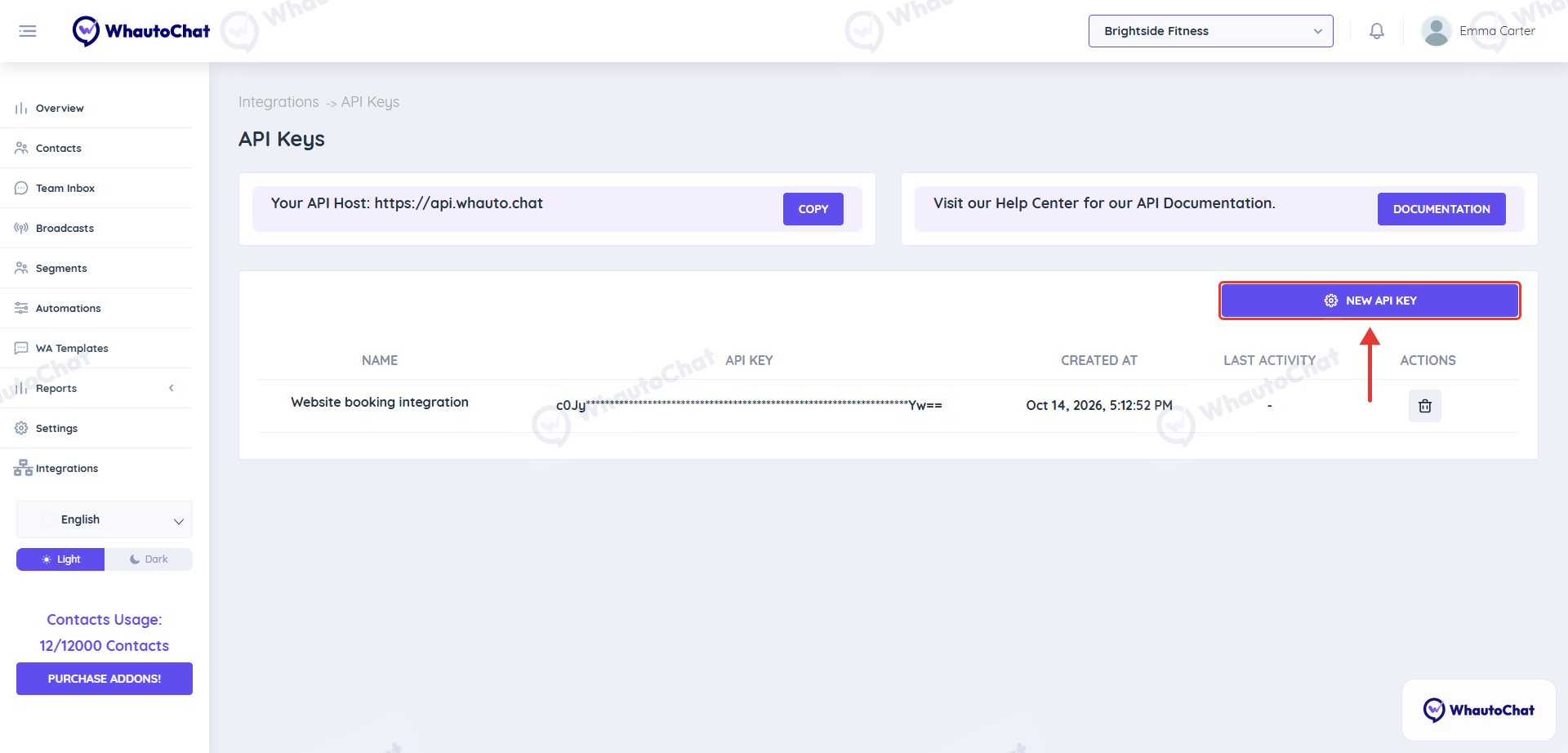
Click New API Key
-
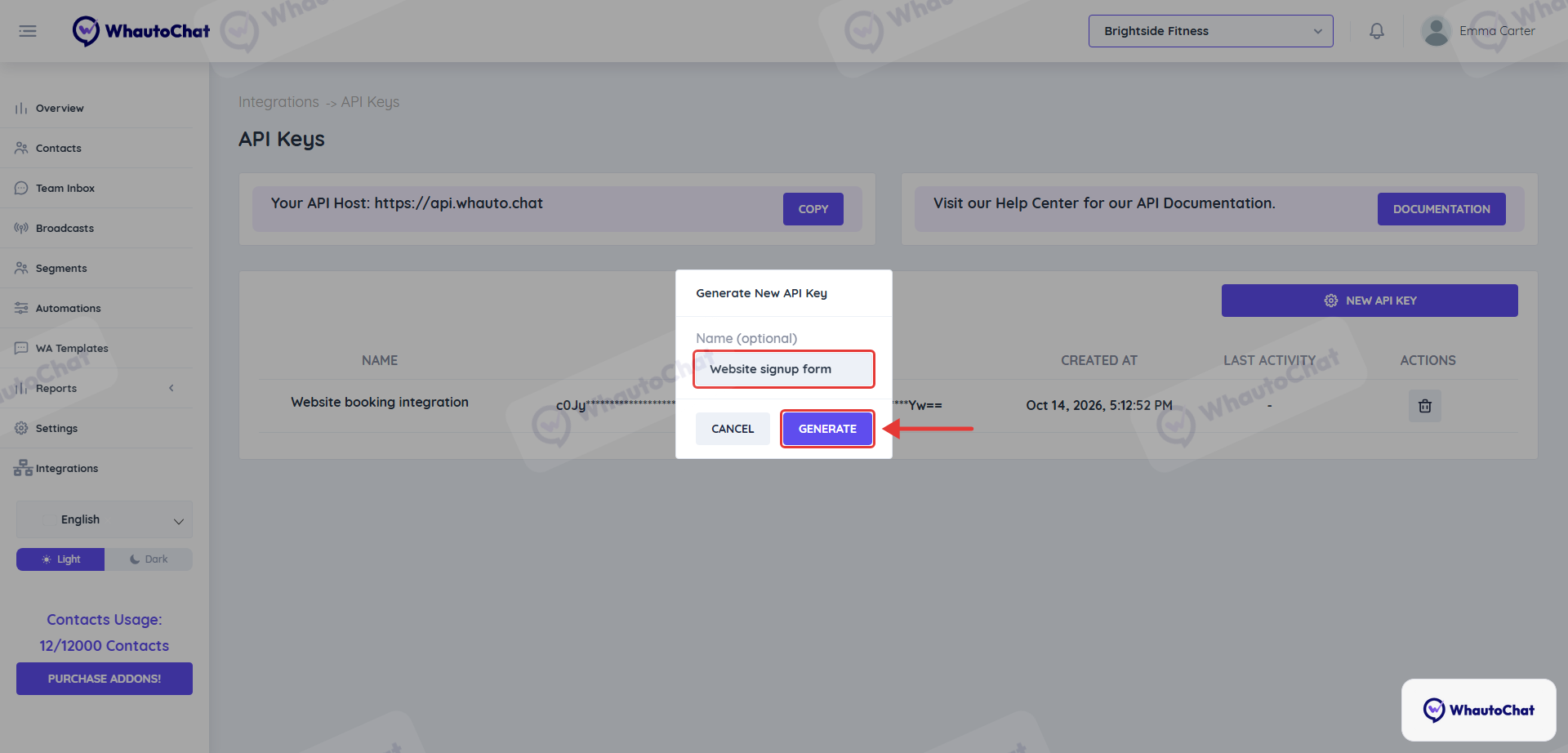
Enter a name (optional), for example "Website signup form", so you know what to delete later.
-
Click Generate, then Copy, and store the key in your system's secret store, not in source code.
-
Click Close
The table lists each key with its Created At date and Last Activity. Click the delete icon to revoke a key: anything using it stops working immediately, so generate the new key first when rotating.
Authentication
Send your key in the x-api-key header on every request.
curl "https://api.whauto.chat/v1/account-info" \
  -H "x-api-key: $WHAUTOCHAT_API_KEY"
A missing, invalid or deleted key returns 401 with the body { "message": "Unauthorized" }.
Requests and responses
- Send JSON bodies with
Content-Type: application/json. - IDs are opaque strings such as
jD6Wq8zCf9. Don't parse them. - Phone numbers are international format with the country code, for example
+12025550188. A leading+is optional. - Most resources belong to a workspace. Pass it in the body as
"workspace": { "id": "..." }or in the query as?workspaceId=. List your workspaces withGET /v1/workspaces. - Lists return a plain JSON array. Single records return the object itself.
- Updates use
PUTand replace the whole record, so send every field you want to keep. - Errors return
{ "error": "message" }with a standard HTTP status.
Pagination
List endpoints take ?page= (default 1) and ?limit= (default 10, max 100). When a page has fewer than limit items, you're on the last page. Message history uses the same parameters.
Errors
| Status | Meaning |
|---|---|
400 | A required field is missing or invalid. error says which. |
401 | Missing, invalid or deleted API key. |
404 | The record does not exist or belongs to another account. |
405 | The method is not supported on that resource, for example creating a workspace. Do it in the app instead. |
500 | Something went wrong on our side. Retry, and contact support if it continues. |
Each endpoint lists the exact errors it returns.
Endpoints
Click any endpoint to open its reference.
/v1/messages/{contactId}Message history for a contactPOST/v1/messages/whatsapp/sendtextWhatsApp textPOST/v1/messages/whatsapp/sendmediaWhatsApp image, video, audio or documentPOST/v1/messages/whatsapp/sendtemplateWhatsApp approved templatePOST/v1/messages/whatsapp/sendinteractivebuttonsWhatsApp reply buttonsPOST/v1/messages/whatsapp/sendinteractivelistWhatsApp list messagePOST/v1/messages/whatsapp/sendinteractivectaurlWhatsApp call-to-action URLPOST/v1/messages/whatsapp/sendcatalogWhatsApp catalogPOST/v1/messages/whatsapp/sendproductWhatsApp single productPOST/v1/messages/whatsapp/sendproductlistWhatsApp product list/v1/messages/instagram/sendtextInstagram text, also sendmedia and sendtemplatePOST/v1/messages/messenger/sendtextMessenger text, also sendmedia and sendtemplatePOST/v1/messages/telegram/sendtextTelegram text, also sendmedia and sendtemplatePOST/v1/messages/tiktok/sendtextTikTok textPOST/v1/messages/tiktok/sendmediaTikTok imagePOST/v1/messages/tiktok/sendqabuttoncardTikTok Q&A button cardPOST/v1/messages/tiktok/sendqatextlinkcardTikTok Q&A text link cardPOST/v1/messages/website/sendtextLive Chat text, also sendmedia and sendtemplate/v1/contactsList and search contactsPOST/v1/contactsCreate a contactGET/v1/contacts/{id}Get a contactPUT/v1/contacts/{id}Update a contactDEL/v1/contacts/{id}Delete a contactPOST/v1/contacts/{id}/tags/addAdd tagsPOST/v1/contacts/{id}/tags/removeRemove tagsPOST/v1/contacts/{id}/assign-chatAssign the chat to a team memberWebhooks
To receive messages, contact changes and delivery updates as they happen, see Webhooks for the events and payloads, and Webhooks API to manage endpoints from code.
Email us at [email protected] and we will get you sorted.